Tips & Tricks: Your Prompt Shortcuts for Better AI Responses
Here you will find 15 quick tricks for everyday prompting: small changes in wording that immediately produce better answers. Each tip stands on its own, so pick exactly what solves your current problem. The fundamentals of prompt structure are covered in How to Write Strong Prompts.
Tip 1: Be Clear & Specific
Why? A language model works purely based on your words. The more precise your request, the less room for misinterpretation.
| Vague Prompt | Result | Improved Prompt | Result |
|---|---|---|---|
| "Write something about our new product." | Generic marketing text | "Write a 100-word announcement for our customer newsletter about the new time-tracking app, focusing on mobile use and GDPR compliance." | Specific, focused text |
Key Points
- Use simple, unambiguous wording.
- Set length or style limits ("max. 3 sentences," "bullet list").
- Review the output and refine as needed.
Tip 2: Test & Iterate Prompt Variations
Even small changes in phrasing can make a big difference. Pose the same task as a question, command, or open sentence starter and compare. An example from sales:
| Format | Example Prompt | Typical Effect |
|---|---|---|
| Question | "Which objections come up most often in first meetings with new customers?" | Compact list of facts |
| Command | "List the five most common objections in first meetings, with one response for each." | Structured, directly usable output |
| Completion | "The most common objection in a first meeting is" | Shortest continuation |
Iterative Refinement
- Start with a rough prompt.
- Review the output.
- Add extra info or limits.
- Resend the prompt.
→ Each round reduces ambiguity.
Tip 3: Context Makes the Difference
Without background, the model makes assumptions. Provide target audience, purpose, product details, and the result will immediately feel more relevant.
| Without Context | With Context & Specification |
|---|---|
| "Write a product description." | "Write a 50-word description for wireless sports earbuds in our online shop. Target audience: runners. Focus: bass quality and secure fit." |
Instruction + Context Format
Start with the task, then introduce the raw text:
Summarize the following email in one sentence.
Dear team, …
This way, the model immediately knows what is text and what is instruction.
Tip 4: Structure Your Prompt
Delimiters like """, ---, or << >> separate instructions, examples, and raw data. The model is less likely to confuse components. For complex, reusable cases, XML tags are ideal:
<task>
  <instruction>Extract names and roles.</instruction>
  <document>
    <paragraph id="1">…</paragraph>
  </document>
</task>
Rule of Thumb: Delimiters for quick organization, XML for templates where colleagues later only swap out parts. Covered in detail with examples: Advanced Prompting.
Tip 5: Control the Output Format
Formats that language models handle particularly well:
- Markdown tables
- JSON / XML for machine-readable data
- Bullet lists
- Clearly defined placeholders
[NAME]
Example
List three main features of the headphones in JSON:
feature,benefit.
The result can be processed further without adjustments, for example for import into a shop system.
Tip 6: Use Visualizations
hermine.ai can generate visual content directly in chat. Use this capability for presentations, explanations, or complex relationships:
| Type | Use Case | Example Prompt |
|---|---|---|
| Mermaid Diagrams | Flowcharts, sequence diagrams, Gantt charts, pie charts | "Create a flowchart for the order process." |
| Mindmaps | Hierarchical topic overviews, brainstorming | "Show me a mindmap about the benefits of remote work." |
| Math Formulas | Equations, scientific expressions | "Explain Euler's formula with derivation." |
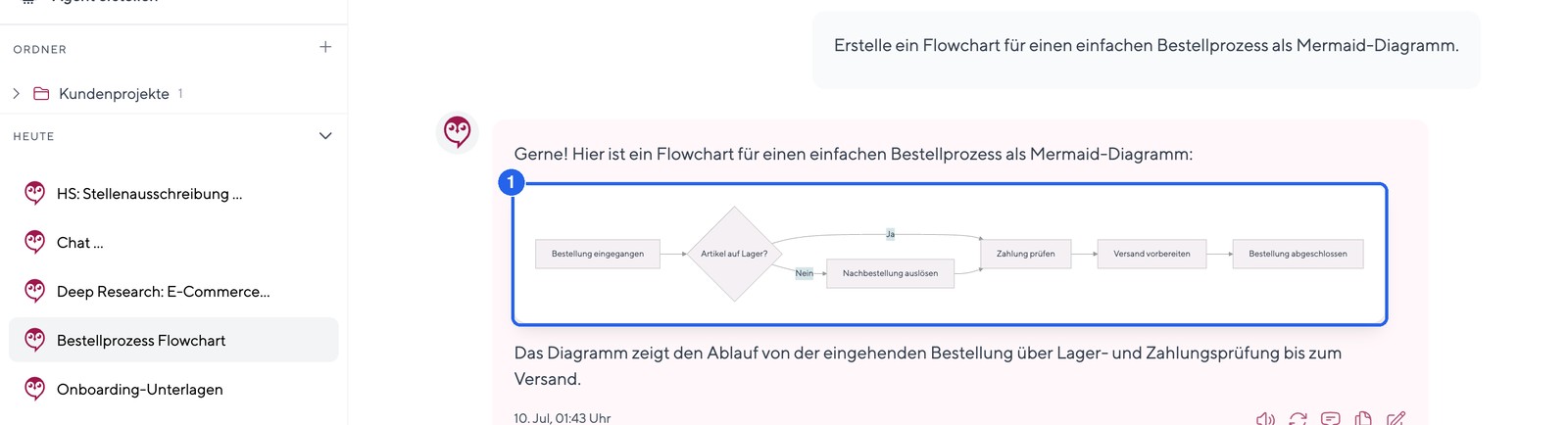
- The rendered Mermaid diagram: hermine.ai automatically turns the diagram code from the AI response into a graphic.
Tip: Ask the model for a specific diagram. It will be rendered automatically in chat, and you can grab the underlying code via the copy button on the code block.
Tip 7: Break Down Tasks (Chain Prompts)
Handle large tasks better step by step, for example in a competitor analysis:
- Prompt 1 → Gather facts about three competitors.
- Prompt 2 → Sort and weight the facts by relevance to your offering.
- Prompt 3 → Prepare the result as a management summary for the executive team.
This way, you maintain control and can correct after each step. More strategies for multi-step tasks: Advanced Prompting.
Tip 8: Use the Context Window Wisely
In long conversations, the model can lose track. Summarize regularly, name sections clearly, and use consistent terms. This keeps the chat coherent even over many pages. For very long documents, a knowledge base is a better place than the prompt itself.
Tip 9: Use Capital Letters as Highlighters
Highlight IMPORTANT WORDS in capital letters, but sparingly. This draws the model's attention, for example: "Answer EXCLUSIVELY based on the attached document."
Tip 10: Use "Nudging" Carefully
Phrases like "This is CRUCIAL for the board presentation" can motivate the model to respond more thoroughly. Don't overdo it, or the effect will diminish.
Tip 11: Specify the Tone
"Use a friendly, professional tone", or alternatively poetic, humorous, academic. If your entire organization should write in the same style, administrators define the rules once centrally under Tonality & Language.
Tip 12: Use Roles with a Clear Expert Profile
"Act as an experienced head of purchasing at an automotive supplier and review this offer for negotiation leverage." Roles with a clear expert image activate the right technical vocabulary and yield more focused answers.
Tip 13: Avoid Negations
Instead of "Do not mention competitors" → "Refer exclusively to our own products." Positive instructions are clearer.
Tip 14: Request Direct Quotes
To check for hallucinations, ask for verbatim text passages or references: "Provide a direct quote from the contract, including the section number."
Tip 15: Control Response Lengths
In hermine.ai, a response can be up to 12,000 tokens long, and up to 75,000 tokens with the Thinking models. For very long texts, it is still best to work in sections: request a continuation with "Continue…" or "Go on", or plan the sections in advance.
Summary & Next Steps
- Start clear: A precise prompt is half the battle.
- Vary & iterate: Test question, command, completion.
- Context + structure = fewer hallucinations, less rework.
- Break down tasks: Step chains keep things organized.
- Fine-tuning hacks: Define tone, use capitals, request direct quotes.
Save prompts that have proven themselves as a prompt template and share them with your team. For multi-step workflows and context strategy, continue with Advanced Prompting.
FAQ: Quick Answers
| Question | Short Answer |
|---|---|
| Why context? | More info → fewer assumptions → more relevant output. |
| How do I practice prompting? | Regularly test different prompt formats and compare outputs. |
| What to do about hallucinations? | Request sources, ask for direct quotes. |
| Can I use negative prompts? | Possible, but positive phrasing is clearer. |
| How long can a prompt be? | Up to the model's capacity (context window); otherwise shorten or split. |
Was this page helpful?