Understanding and Using Reasoning Models
Reasoning models think before they answer: they internally break complex tasks into intermediate steps and thus deliver much more reliable results for logic, planning, and analysis. In this article, you will learn when a reasoning model is worth it, how to set the Thinking mode and thinking duration in hermine.ai, and how to prompt these models correctly.
What Differentiates Reasoning and Standard Models?
| Feature | Reasoning Models (Thinking) | Instant Models |
|---|---|---|
| Strengths | Strategic planning, multi-step reasoning, accurate decisions for complex tasks | Fast execution of well-defined tasks, low latency, cost-effective |
| Use Cases | Math & science, law, finance, agent planning, complex analysis | Chatbots, text generation, code snippets, real-time responses |
| Latency/Cost | Higher | Lower |
Rule of Thumb: Thinking models think, Instant models deliver. Often, the reasoning model plans the solution path and an Instant model executes subtasks.
Reasoning Models in hermine.ai
These models currently support thinking mode:
- GPT 6.1 Sol Thinking and GPT 6 Luna Thinking
- GPT 5.6 Sol/Terra/Luna Thinking and the Thinking variants of GPT 5.5, 5.4, 5.2 and 5.1
- Claude Opus 5.5, Claude Sonnet 5.5 and Claude Haiku 5.5
- Qwen 3.5 (open source)
You can recognize reasoning-capable models in the model selection by the Thinking badge. For an overview of all models, see Choosing the Right Model.
Setting the Thinking Mode (Step by Step)
- Use the model button above the input field to select a model with the Thinking badge (e.g., GPT 6.1 Sol Thinking).
- Click the stopwatch button Thinking next to the input field. It is only visible when a reasoning model is active.
- Under Thinking duration, choose one of the three levels:
| Thinking duration | When is it useful? |
|---|---|
| Quick | Fast responses for simple questions |
| Standard | Balance between thinking and speed |
| Comprehensive | Longer thinking for complex questions |
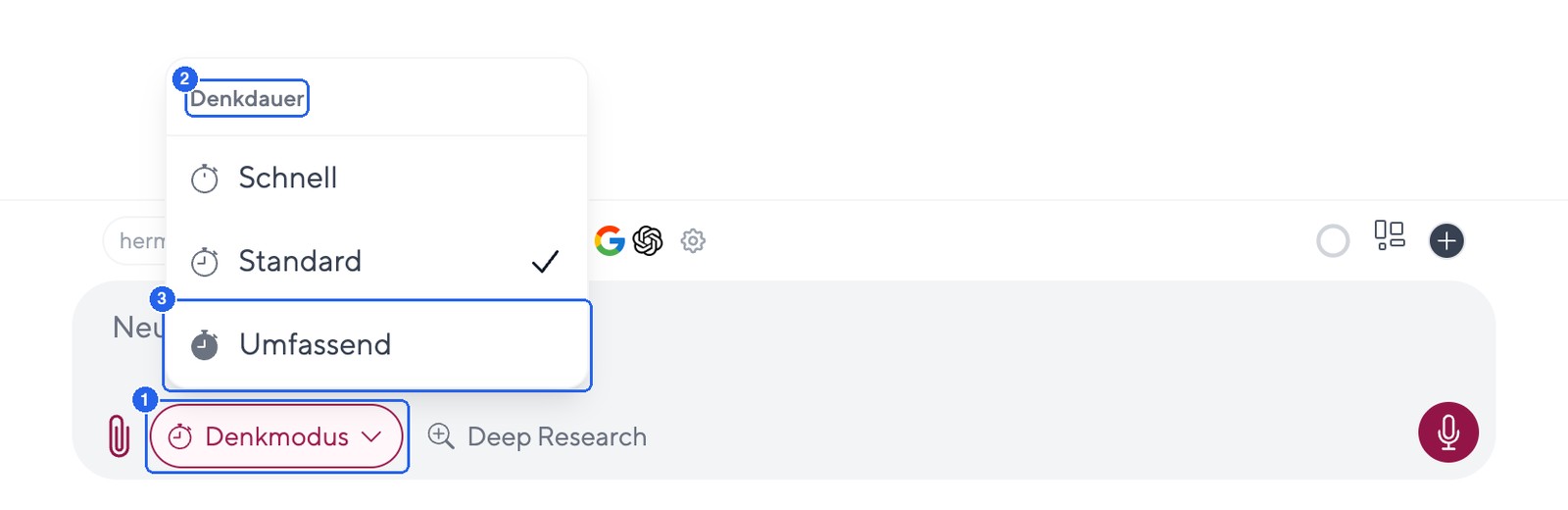
- The stopwatch button Thinking: only visible for reasoning models.
- Under the heading Thinking duration, you select the thinking level.
- The Comprehensive option lets the model think longer for complex questions.
Decision Guide
- Is speed & budget a priority? → Instant model.
- Is the task clearly defined? → Instant model.
- Is high accuracy required? → Thinking model, e.g. GPT 6.1 Sol Thinking.
- Multi-step problem with many unknowns? → Thinking model with thinking duration Comprehensive.
Most workflows combine both: Planner (Thinking) + Executor (Instant).
Typical Use Cases for Reasoning Models
Clarifying Ambiguous Questions
Reasoning models ask follow-up questions instead of guessing. If you ask, for example, for "a vacation coverage plan for our team," a good reasoning model asks about team size, core hours, and critical tasks before making a proposal.
Finding the "Needle in the Haystack"
Provide hundreds of pages of unstructured text, and reasoning models filter out the relevant paragraphs. An example from administration: "Find all notice periods and special termination rights in this 300-page framework agreement."
Identifying Hidden Relationships
In financial reports with cross-references across multiple documents, reasoning models draw conclusions not explicitly stated in a single document.
Agentic Planning
A reasoning model breaks down a customer request into ten subtasks, selects the appropriate Instant model for each step, gathers results, and delivers the final report.
Visual Logic
Models with image input like GPT 6.1 Sol Thinking recognize table structures in blurry PDF scans or derive material lists from blueprints.
Code Reviews
Large pull requests can be thoroughly analyzed by reasoning models; diff lines across multiple files are consistently evaluated.
LLM as Judge
In evaluation pipelines, a reasoning model assesses the quality of other model responses far more consistently than fast models.
Effective Prompts for Reasoning Models
-
Keep it short & clear
Reasoning models don't need "step-by-step" instructions; they think internally. -
Start with Zero-Shot
Often, a single, clean prompt is sufficient. -
Use Delimiters
Separators like---, XML tags, or headings help isolate context sections. -
Specify Target Criteria
"Solution must consider a budget < €500." -
Few Examples, If Any
Only include a few concise examples for very specific output formats.
Note: The previously recommended prefix "Formatting re-enabled" for Markdown output is not needed in hermine.ai. The platform adds it automatically to the system prompt for the models in question.
Example Workflow: Return Decision
- GPT 6 Luna Instant extracts customer and order data from an email.
- GPT 6.1 Sol Instant identifies potential return reasons and the applicable policy.
-
GPT 6.1 Sol Thinking evaluates whether the return is permissible based on the policy and provides a structured decision (
approved | rejected | follow-up required). - GPT 6.1 Sol Instant drafts the response email to the customer.
This division saves tokens and runtime while maintaining the highest accuracy for the critical decision step.
Related: Deep Research
For multi-step web research, hermine.ai additionally offers Deep Research: activate the Deep Research toggle in chat (without an agent selected), and the AI performs an extensive investigation with web search and analysis. This can take several minutes. See Deep Research for details.
Conclusion
Reasoning models are your specialists for deep thinking, and Instant models your all-round automation tools. Used together, they solve complex workflows both precisely and efficiently. Start with a clear zero-shot prompt using a Thinking model and expand only if necessary. This keeps costs low and quality high.
Tip: Start with the Standard thinking duration. Only switch to Comprehensive if the answer turns out noticeably too superficial, since longer thinking costs time and tokens.
Was this page helpful?