Choosing the Right Model: Guide for hermine.ai
Status: October 2026
In this guide, you will get to know all models available in hermine.ai and quickly find out which model fits your task via the decision table and practical workflows.
Why Model-Agnosticism?
No single model excels in all disciplines. Some shine with speed, others with deep reasoning. hermine.ai allows you to switch freely, even within the same chat. This way, you can combine speed, cost, and accuracy based on your task: an Instant model for the quick email, a Thinking model for the board analysis.
Our Models (Current Status)
Every GPT model comes in two variants: Instant answers right away without a thinking pause, Thinking reasons before answering and lets you set the thinking effort. GPT-6.1 is the current generation (Sol is the default, Terra costs about half as much); GPT-6 and GPT-5.6 stay available for existing workflows.
| Model (UI) | Model-ID | Category | Description | Typical Use Cases |
|---|---|---|---|---|
| GPT 6.1 Sol Instant | gpt-6.1-sol-instant |
General | Default model: current generation, strong quality, fast answers | Everyday tasks, chat, email, summaries, agents |
| GPT 6.1 Sol Thinking | gpt-6.1-sol-thinking |
Reasoning | The default with thinking mode for complex tasks | Planning, analysis, difficult decisions, code |
| GPT 6.1 Terra Instant | gpt-6.1-terra-instant |
General (economical) | Same generation at about half the price of Sol | Routine work with high volume, drafts, summaries |
| GPT 6.1 Terra Thinking | gpt-6.1-terra-thinking |
Reasoning (economical) | Thinking mode at about half the price of Sol | Structured analyses, many mid-sized reasoning tasks |
| GPT 6 Sol Instant / Thinking |
gpt-6-sol-instant, gpt-6-sol-thinking
|
Previous generation | Still available, existing picks are moved to GPT 6.1 Sol | Existing agents and workflows |
| GPT 6 Luna Instant | gpt-6-luna-instant |
Efficient | Very fast and very cheap, a twentieth of the Sol cost | Routine tasks, classifications, high volume |
| GPT 6 Luna Thinking | gpt-6-luna-thinking |
Reasoning (efficient) | Affordable reasoning at a fraction of the Sol cost | Structured evaluations, many small analyses |
| GPT 5.6 Sol / Terra / Luna |
gpt-5.6-sol-*, gpt-5.6-terra-*, gpt-5.6-luna-*
|
Previous generation | Still available (Instant and Thinking), pricier than the GPT-6 counterpart | Existing agents and workflows |
| GPT 5.5, 5.4, 5.2, 5.1 |
gpt-5.5-* to gpt-5.1-*
|
Older generations | For existing workflows, not recommended for new ones | Existing agents |
| GPT 5.4-mini, 5.4-nano, 5-mini |
gpt-5.4-mini, gpt-5.4-nano, gpt-5-mini
|
Compact | Small models, superseded by GPT 6 Luna | Existing automations |
| Claude Opus 5.5 | claude-opus-5-5 |
Premium | Highest-quality Claude model for nuanced reasoning and long-form output | Demanding analysis, premium writing, strategy, concept work |
| Claude Sonnet 5.5 | claude-sonnet-5-5 |
General | Balanced Claude model for strong quality across analysis and everyday work | Writing, analysis, reviews, longer structured outputs |
| Claude Haiku 5.5 | claude-haiku-5-5 |
Fast | Fast, efficient Claude model for lightweight tasks and summaries | Short answers, summaries, classification, cost-aware automations |
| Qwen 3.8 27b | qwen3.8-27b |
Open Source | Alibaba's current open-source model, fast and cheap, hosted in the EU (Scaleway) | Open-source requirements, fast routine tasks, multilingual text |
| Qwen 3.5 | qwen3.5-397b-a17b |
Open Source | Open-source MoE model with 397B parameters (17B active), multilingual | Code, multilingual tasks, open-source requirements |
| Qwen 3.6 35b | qwen3.6-35b-a3b |
Open Source | Small, fast open-source model | Simple tasks with an open-source requirement |
Note: The Claude models run on Microsoft Azure AI Foundry and may be disabled depending on your account. In that case, they do not appear in the model selection. The default model in chat is GPT 6.1 Sol Instant unless your account has set its own default (see Platform & Models). Claude Opus 5.5 is billed as a premium model.
Quick Check: Which Model Fits?
| Priority | Recommendation |
|---|---|
| Best default for "almost everything" | GPT 6.1 Sol Instant |
| Most demanding tasks, best quality | Claude Opus 5.5 or GPT 6.1 Sol Thinking |
| Complex planning and deep analysis | GPT 6.1 Sol Thinking |
| Very fast routine responses, high volume | GPT 6 Luna Instant |
| Affordable reasoning for many small evaluations | GPT 6 Luna Thinking |
| High-quality writing and structured long-form output | Claude Sonnet 5.5 or Claude Opus 5.5 |
| Open-source requirement | Qwen 3.8 27b, Qwen 3.5 for very complex tasks |
Switching Models in Chat (Step by Step)
- Open a chat. Above the input field, you will see the model button showing the current model name (e.g., GPT 6.1 Sol Instant).
- Click it. The model list opens with the Search models field.
- If needed, click More models to show all available models (Fewer models collapses the list again).
- Select a model with a click. The existing chat history is preserved and handed over to the new model. hermine.ai remembers your selection for upcoming chats.
- You can recognize reasoning-capable models by the Thinking badge. For these, you can set the thinking duration (Quick, Standard, Comprehensive) via the stopwatch button. Learn more under Understanding and Using Reasoning Models.
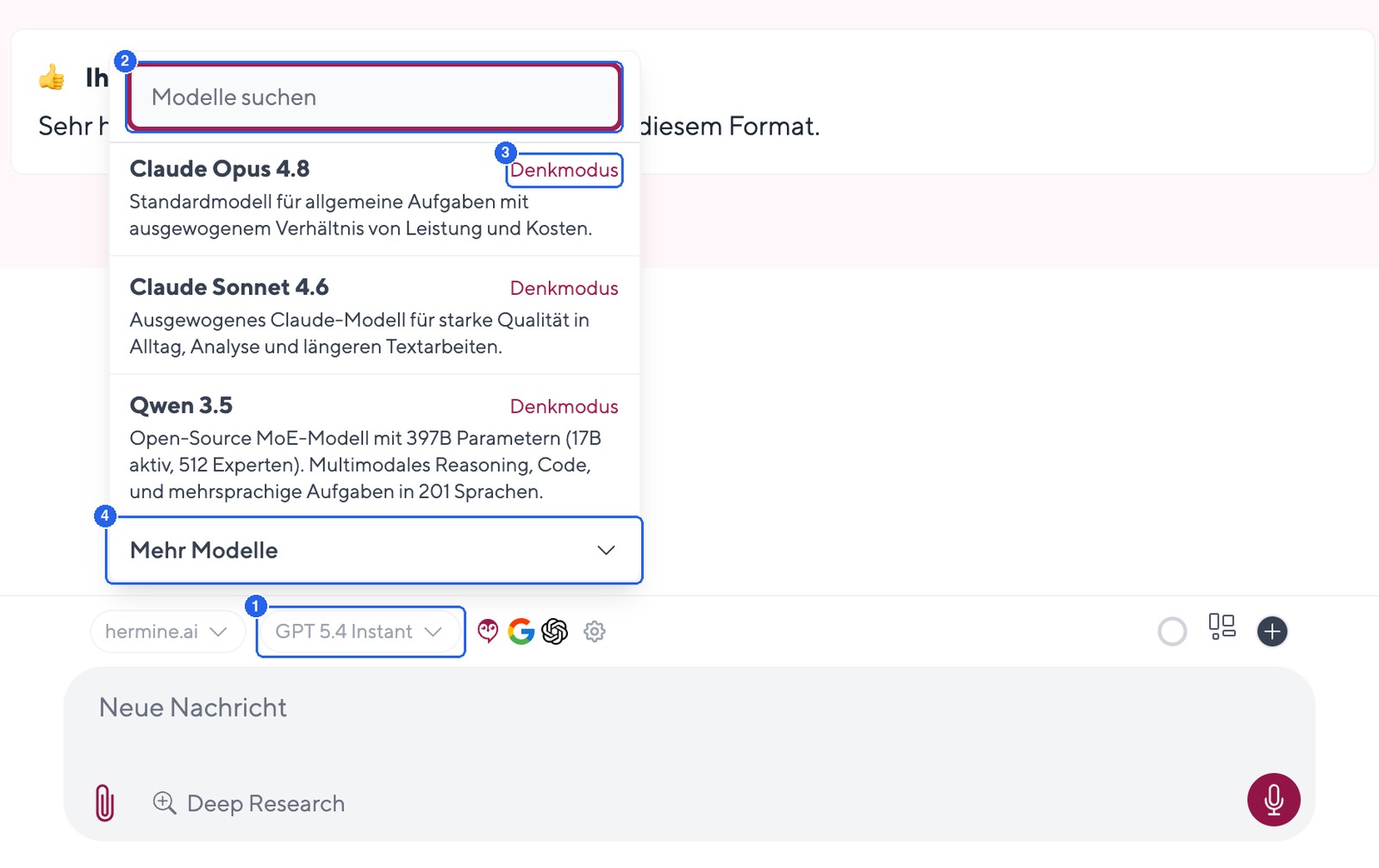
- The model button above the input field shows the currently selected model.
- Use the Search models field to filter the list.
- The Thinking badge marks reasoning-capable models.
- More models shows all remaining available models.
Practical Workflows
Everyday and Chat
Standard responses, emails, short reports
Model: GPT 6.1 Sol Instant
Why: Good all-rounder, great price/performance ratio.
Most Demanding Tasks
Strategy papers, sensitive decisions, highest quality standards
Model: Claude Opus 5.5 or GPT 6.1 Sol Thinking
Why: The strongest models of their respective families, maximum quality.
Multi-Step Planning or Difficult Decisions
Strategic planning, decision trees, deep analysis
Model: GPT 6.1 Sol Thinking
Why: Stable for complex tasks, fewer hasty misjudgments.
Support, Standard Reports, Translations
Customer support, reporting, summaries
Model: GPT 6 Luna Instant
Why: Fast, very cheap, built for high volume.
High-Quality Writing
Blog articles, concepts, longer structured documents
Model: Claude Sonnet 5.5 or Claude Opus 5.5
Why: Nuanced writing style, strong with long-form texts.
Code, Logic, and Visual Reasoning
Code generation, logical tasks, technical drawings
Model: GPT 6.1 Sol Thinking
Why: Strong reasoning plus image input.
Open-Source Requirement
Compliance requirements, multilingual tasks
Model: Qwen 3.8 27b, Qwen 3.5 for very complex tasks
Why: current open-source models hosted in the EU; 3.8 answers much faster than the large 3.5.
Optimizing Costs vs. Quality
- Use a hybrid approach: Reasoning model for planning, then Instant model for execution (an example workflow is included in the article on reasoning models).
- Shorten context: Remove irrelevant paragraphs to save tokens. Extensive documents belong in a knowledge base.
- Standardize outputs: Clear format specifications reduce follow-up questions and costs, most easily via a prompt template.
Conclusion
hermine.ai covers a wide range: from turbo chatbots to in-depth analysts, including an open-source option. Test in your use case, measure speed, cost, and quality, and create your ideal model mix.
Tip: Start with GPT 6.1 Sol Instant for brainstorming, for example. Switch to GPT 6.1 Sol Thinking or Claude Opus 5.5 when deeper analysis is needed.
Was this page helpful?