Legal & Data Protection
This page bundles everything that data protection officers, IT security and compliance teams need to know about hermine.ai: infrastructure, sub-processors, contract documents and retention periods.
Overview for data protection officers
- EU hosting: The platform runs on infrastructure from Hetzner (Germany) and Scaleway (France).
- AI models in EU regions: Microsoft Azure OpenAI, Google Vertex AI, Mistral AI and the self-hosted open-weight models at Scaleway are each operated in EU regions. The only exception are the optional Anthropic models (Claude) on Microsoft Azure AI Foundry, which can be switched off per account (see below).
- No training of external models: Your data is not used to train external AI models.
- DPA included: The data processing agreement under Art. 28 GDPR is accepted digitally or (for public authorities) concluded with signatures, including a public sub-processor list.
Architecture overview
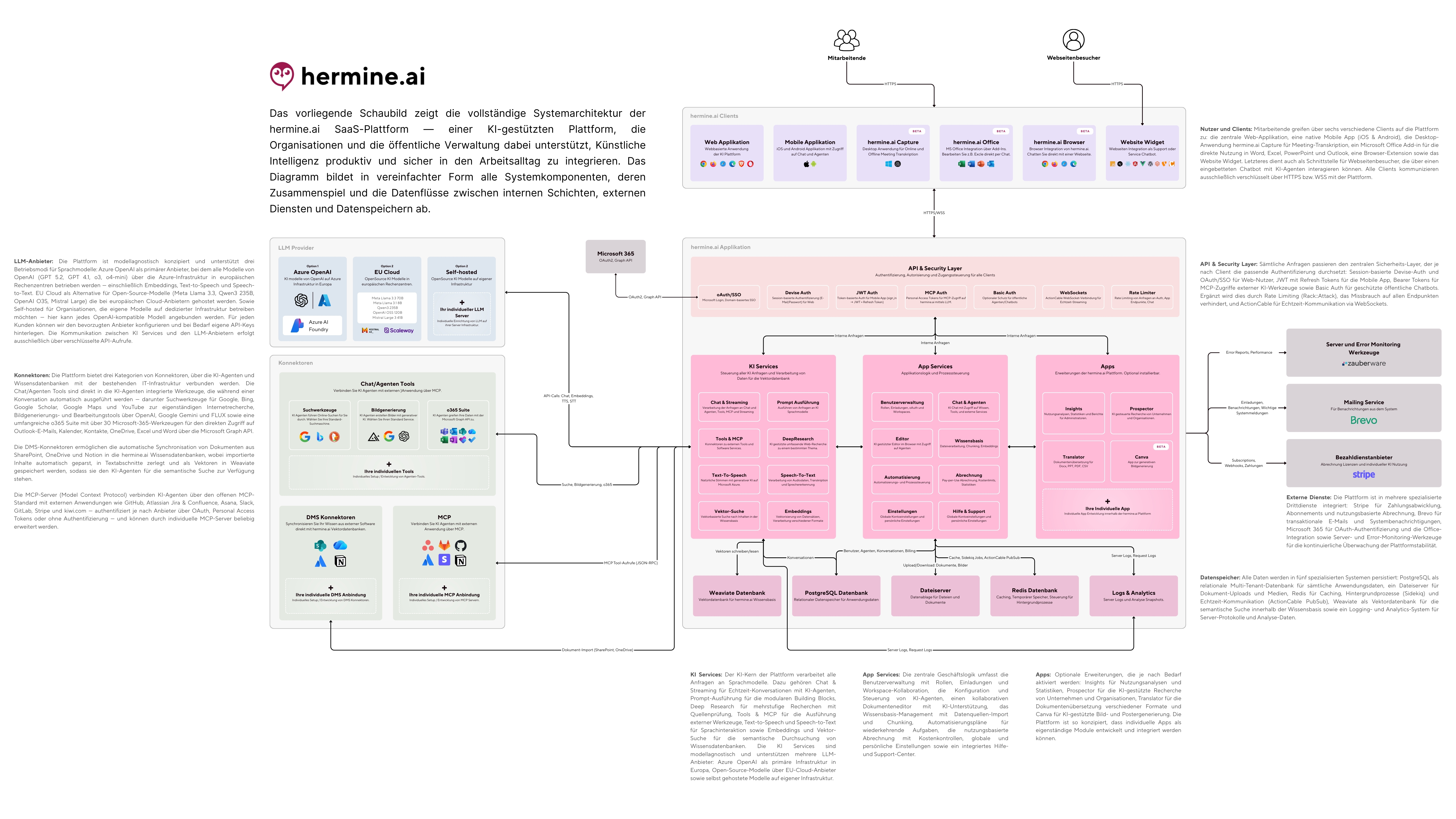
Download architecture diagram (JPG, approx. 4 MB)
Sub-processors (Art. 28 GDPR)
hermine.ai maintains a public, continuously updated register of all sub-processors. You can reach it without logging in at the path /subprozessoren of your hermine.ai instance (e.g. https://app.hermine.ai/subprozessoren). The list is part of the data processing agreement (DPA).

- Page title Sub-processors: the public register under Art. 28 GDPR.
- The columns Provider, Purpose/service, Processing location and Transfer basis document all details per sub-processor.
- The note on the objection period: new sub-processors are announced in advance, and controllers may object within 30 days.
The sub-processors in use include, among others:
| Provider | Processing location |
|---|---|
| Hetzner | Germany |
| Scaleway | France |
| IONOS | Germany |
| Microsoft Azure OpenAI | EU region |
| Microsoft Azure AI Foundry (Anthropic) | EU endpoint Sweden, global balancing possible |
| Google Vertex AI | EU region |
| Mistral AI | France |
The current version of the public page is always authoritative.
Special case: Anthropic models (Claude)
The Claude models run on Microsoft Azure AI Foundry. Access goes through our European endpoint in Sweden; to answer requests, Microsoft may balance processing across Azure regions outside the EU. If your data must be processed exclusively within the EU, disable the Anthropic models under Settings › Platform & Models. They then disappear from chat, agents and all extensions, while every other model stays available. Questions about TOMs, hosting, logging and deletion paths are answered on Information Security & TOMs.
Accepting terms of use & DPA digitally
For companies (B2B), the contract is concluded digitally via click acceptance, no signature required. When a new version is available, administrators see a banner with a deadline. The acceptance itself can only be performed by the account owner.
- Open Settings and choose Terms of use in the Legal group. The Terms of use & DPA page shows the current version.
- Review the content via Show full text or export it via Export current version as PDF.
- Tick the checkbox I accept the current terms of use and the data processing agreement (DPA) on behalf of our organization.
- Click Accept terms.
The acceptance is logged in an audit-proof way with timestamp, user and version. Under Your confirmed documents you will find PDF records for download, and under Acceptance history all confirmed versions. Two document types are accepted: the Terms of use and the Data processing agreement (DPA).
Contracts & offers (public sector)
Public authorities and public-sector customers conclude the contract in the classic way with signatures. For this, there is a self-service under Settings > Contracts that generates the offer, contract and DPA as PDFs:

- Page title Contracts & offers: the self-service contract documents.
- Step card Generate contract package: contract and DPA as PDFs.
- Button Generate contract package (2 PDFs): creates immutable document snapshots.
- Step card Sign & send by post: conclusion by post, the status then appears here.
You can find the complete step-by-step guide under Contracts & offers.
Data retention & deletion periods
hermine.ai implements storage limitation under Art. 5 (1) (e) GDPR with automated deletion routines:
| Data | Retention | Configurable? |
|---|---|---|
| Conversations of logged-in users (without a document, not marked) | Automatic deletion after 16 months | No |
| Widget conversations (anonymous visitors) | 16 months default, shortenable per account to min. 30 days | Yes, per account |
| Meeting audio (Capture) | 72 hours after successful transcription; 30 days after creation if processing fails | No |
| Raw transcripts (Capture) | 30, 90, 180, 365 (default) or 730 days, alternatively unlimited (Enterprise) | Yes, per account |
| Deletion audit logs | Cleaned up after 12 months | No |
You configure the retention period for widget conversations under Settings › Data privacy. That same area is where you handle access and deletion requests from chatbot users; see Access & Deletion (GDPR).
You configure the transcript retention period in the Capture settings in the Data Retention section via Transcript Retention Period, with the options 30 days to 730 days (2 years), 365 days (default) as the preset and Unlimited (Enterprise). Summaries, action items and clarification points are preserved; only raw transcripts, speaker data and speaker mappings are deleted. The audio deletion period is fixed and not configurable.
Consent & analytics privacy
- AI consent modal: Before first use, all users confirm a configurable consent, see Consent modal. The granted consents can be exported as evidence.
- Analytics privacy: Administrators and owners can use the setting Exclude my chats from analytics to ensure their conversations do not appear in sentiment analyses, chat summaries, interaction insights or quarterly reports. General usage figures (total counts, costs) are still recorded.
Contact for data protection inquiries
For questions from your data protection officer, about DPA details or about technical and organizational measures, reach us at hello@hermine.ai.
Tip: Link the public sub-processor page directly in your internal data protection wiki. That way your data protection officers always have the current version without having to ask us.
Was this page helpful?